 Magnum
 Ferrari-fast. Aloha-easy. Detective-sharp.
Magnum BI answers in seconds, sets up without a fuss, and gets the numbers right: dashboards your whole team can trust. It's a lightweight business intelligence tool that's easy to run from a friendly web interface — and just as easy to control as code or through its API. Every change goes through the same rules, so what people see always matches what you configured.
Copies a ready-made setup prompt: paste it into Claude Code, Cursor, Codex or any coding agent. How it works
- Point-and-click UI
- Configuration as code
- API-first
- Tenant-isolated cache
- Agent-ready (MCP)
Everything your team needs to understand its numbers
From the first chart to a trusted data catalog, in one friendly place. No SQL to learn, no data to copy around.
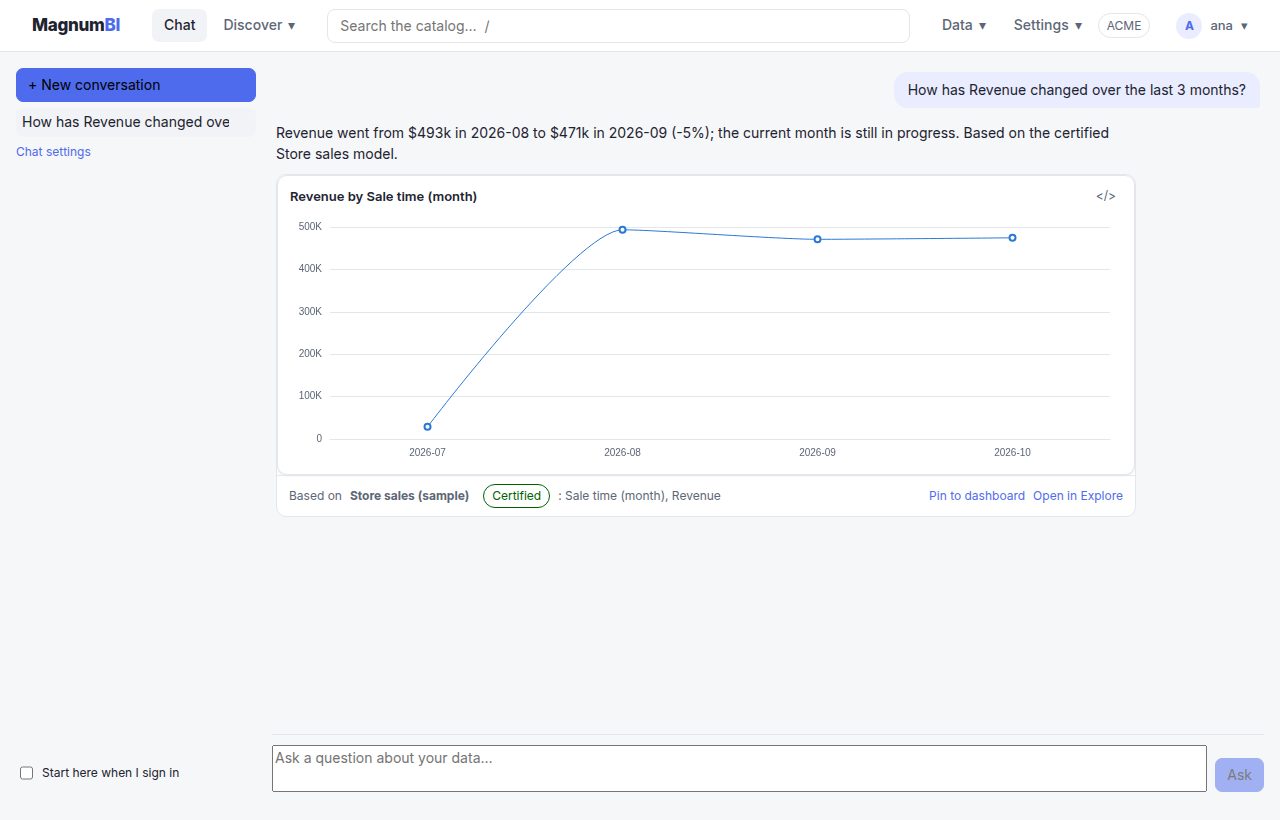
Just ask
"How did sales go last month?" The answer comes in plain words, with the chart it's based on. People who never open a dashboard can start here.
- Uses your own AI provider and key: OpenAI, Anthropic, Mistral, or a model on your own servers
- Sees only what the person may see, and only what you allow to leave
- Prepares dashboards, reports and alerts, made when the person says yes
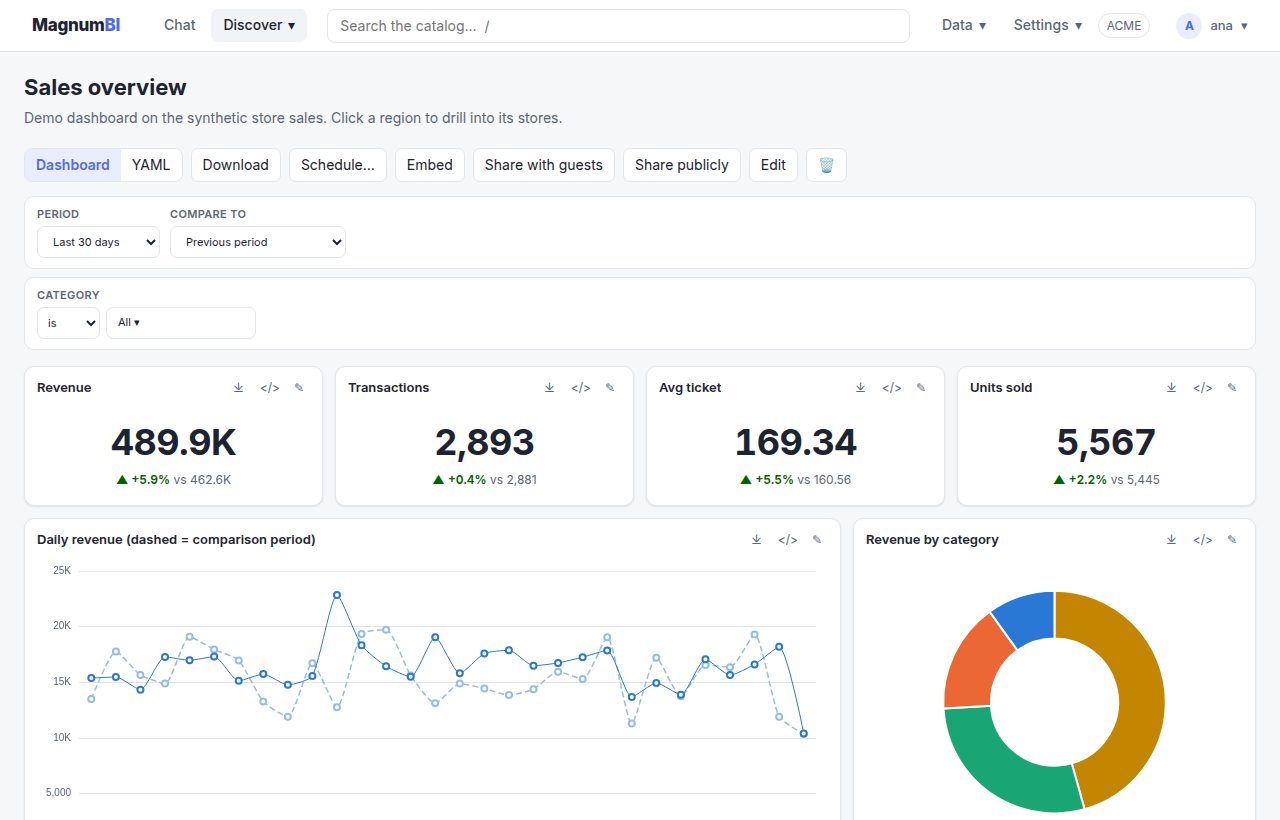
Dashboards people actually read
Clear charts that answer the question at a glance, and get you to the detail in a click.
- Compare with last month or last year, with the change on every number
- Click a region to see its stores, then its days
- Filters, tabs and notes, on any screen size
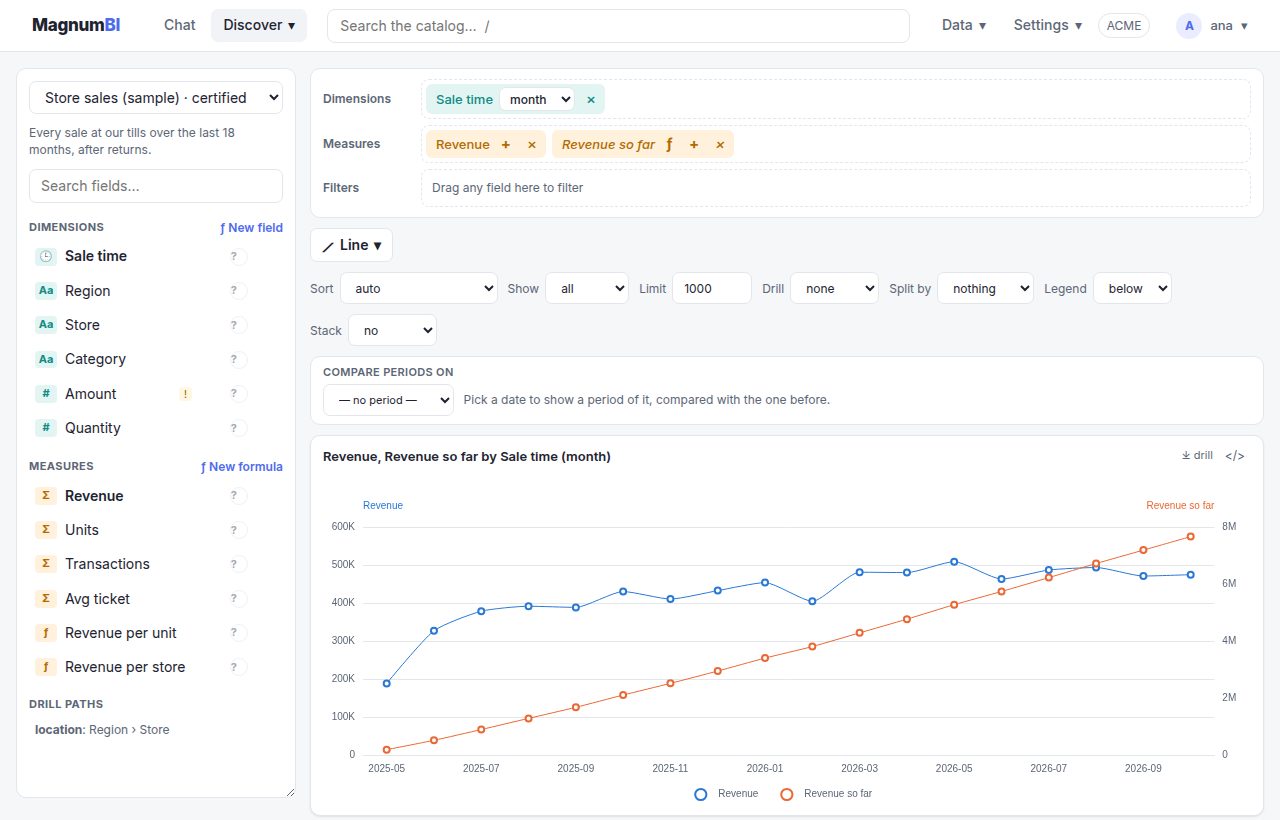
Ask your own questions, no SQL needed
Drag the fields you care about, pick a chart, and you have your answer. Need a calculation? Click it together, like in a spreadsheet.
- Formulas such as revenue per sale, running totals and shares of the total
- Checked as you type, with the mistake pointed out in plain words
- Save any chart to a dashboard in one step
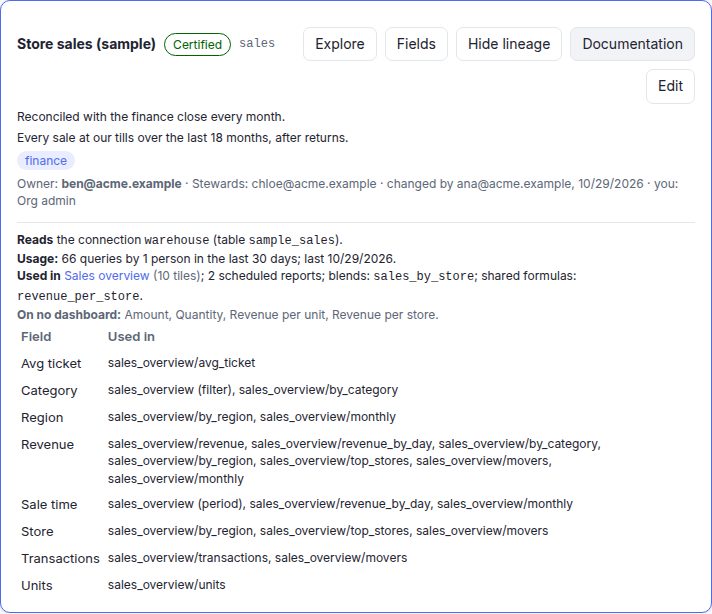
Know what every number means, and whether to trust it
Every model has an owner who answers for it, a status that says if it's certified, and plain-language descriptions of every field.
- Certified, draft or deprecated, with the reason, wherever the data appears
- A shared glossary, and search that knows your words ("takings" finds Revenue)
- A ? next to every field says what it means, right where you build charts
- See where each number is used before you change it
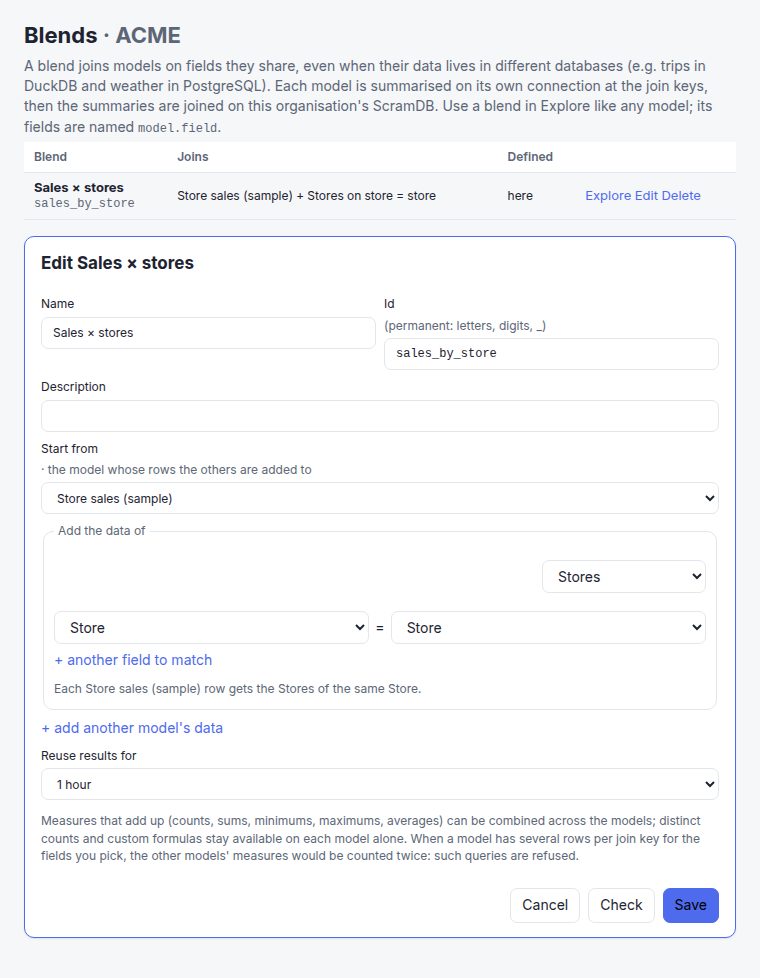
Put data from different places side by side
Sales in your database, targets in BigQuery, weather from an open dataset: combine them in one chart, without moving the data.
- Join on shared fields like store, region or date
- Each source is summed up where it lives; only the totals travel
- Works across PostgreSQL, BigQuery, DuckDB and ScramDB
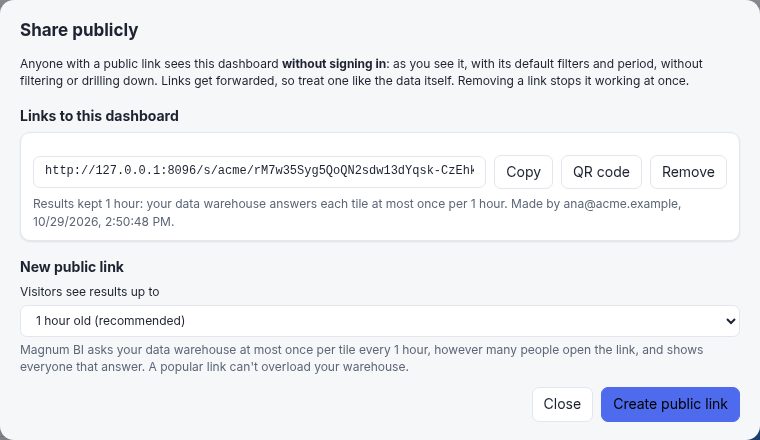
Share safely, inside and outside the company
Send a public link, give a partner a password-protected view, or put a dashboard on your intranet.
- Everyone sees only the data they're allowed to, even through a link
- Guest links expire, and you can switch any link off at once
- Embed a dashboard with one line
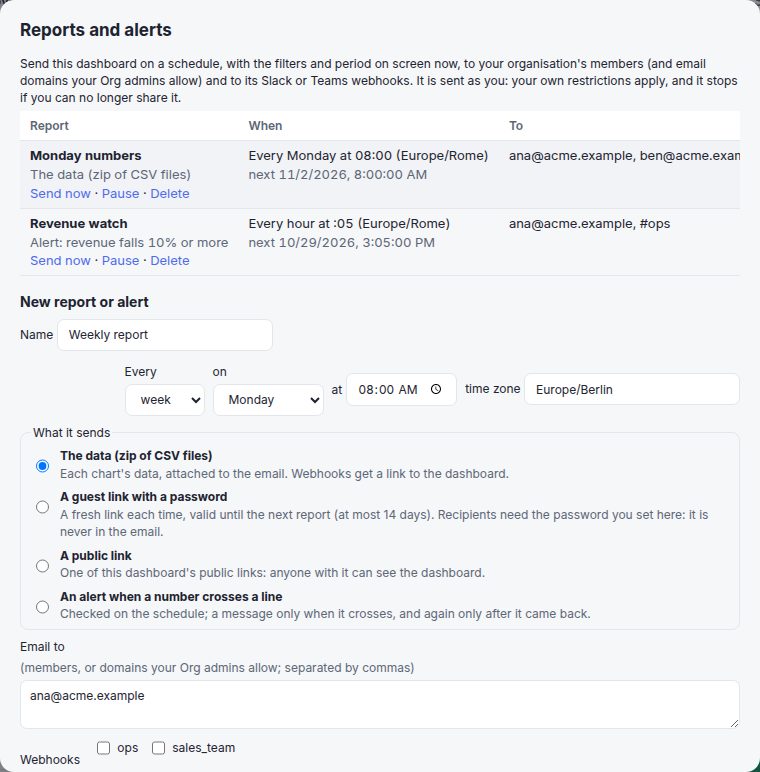
The numbers come to you
Get the Monday numbers in your inbox or team chat, and hear about it when something moves.
- Scheduled by email, Slack or Teams, in your time zone
- Alerts when a number crosses a line, or rises or falls sharply
- Data files, a secure link, or a public one: you choose
And more: AI agents that work with your data safely, your own colours, single sign-on, usage insights. See everything · Read the docs
Click or code. Same result, every time.
Manage Magnum BI the way that suits each person and each task. Analysts use the web interface, engineers keep definitions in git, scripts talk to the API — and they all go through the same front door.
Easy in the UI
Build dashboards with drag and drop, add connections and test them, invite members, set roles and filters. No files, no terminal, no SQL needed.
Versioned as code
Everything set up in the app (models, dashboards, members and row filters, connections, reports) exports to plain YAML and applies back after a plan, like terraform: magnum-bi code plan. Review it in pull requests; secrets never go in the files.
Scriptable by API
Everything the UI does, it does through the same HTTP API you can use: dashboards (as JSON or YAML), blends, connections, members, platform settings and queries.
Why it stays consistent
There is no “UI version” and “code version” of your setup to drift apart. There's one, and every path leads to it.
- The UI is an API client. It has no private shortcuts, so anything you can click, you can automate.
- Dashboards are YAML underneath. Edit one in the designer and its YAML view updates; paste YAML and the designer shows it. Same object, two views.
- One set of rules. A change is checked the same way whether it comes from a click, a file or a script — invalid changes are refused, never half-applied.
- Definitions you can review. Models (what “revenue” means) are YAML in git or made by admins in the app, with no SQL, and every one can be exported and applied as code.
- Full history. Every dashboard save is kept with its author, whichever way it was made.
Blazing fast. Isolated by design.
Magnum BI runs on ScramDB: each organisation gets its own ScramDB instance holding its dashboards and its query cache. Answers come back fast, and one tenant's data never sits next to another's.
Results as real tables
Cached results are stored as typed tables in ScramDB, not blobs. The same tables power blends, so joining data across engines is fast too.
One cache per tenant
Each organisation's cache lives in its own ScramDB instance. If one is slow or unreachable, only that organisation notices — sign-in and every other tenant keep working.
Never leaks across people
Cache entries include each person's row filters, so a cached answer is only shared between people who'd see exactly the same rows anyway.
Caching is opt-in per model (cache: 15m), so live data stays live where it matters. Admins can see and clear their cache at any time. How the cache works →
Deployed by your agent in minutes
Magnum BI is made to be set up by coding agents. It ships as one Docker image with a Compose file and a Helm chart, the repository has an AGENTS.md with every command and rule, and every setting is an environment variable or a YAML file.
Copy one prompt into Claude Code, Cursor, Codex or any coding agent. It checks for Docker, starts Magnum BI with its own database, loads the NYC taxi demo and hands you the URL and your first sign-in. It asks before installing or downloading anything.
- Set up for you. From an empty folder to a running demo, with one prompt.
- Then work with you. Connect the agent over MCP and ask it for a dashboard, a blend or a theme in your company's colours.
- Safely. API tokens act with your role or less, can be read-only, and always expire. Every change can be dry-run first and is checked against the current version.
- On the record. Everything an agent does is in the usage log under its token's name.
Just you? Magnum BI lite
The same Magnum BI for one person, as an app: no server, no Docker, no accounts. It runs on your computer with its own database, in a window of its own, and answers only there. Connect a database or open CSV and Parquet files, or start with the New York taxi × weather sample data, one click away.
Free and unsigned: macOS and Windows ask the first time. How to open it.
- Yours alone. Everything stays in one folder on your computer; nothing listens beyond it.
- The whole toolkit. Models, blends, formulas, themes, dashboards, exports and the chat assistant.
- Optional PIN. Lock it when others use your computer.
- Grows with you. Models and dashboards are YAML: move them to the server when the team joins.
Everything you need, nothing you don't
Magnum BI keeps business intelligence simple: one place to define what your numbers mean, and friendly tools to look at them.
Models & dashboards as YAML
Define dimensions, measures and drill paths in readable files. Keep them in git, review changes, and reuse one model across every team.
Drag-and-drop explorer
Drop fields onto shelves to build a chart, pick a chart type, and save it to a dashboard. Add formulas by clicking fields: revenue / transactions, fields of each row like amount * qty, running totals and shares of the total. Share them with your organisation. No SQL required — though you can always see it.
Drill down
Click a region to see its stores. Drill paths come from the model, so everyone follows the same route through the data.
Period comparison
Compare with the previous period, the previous year, or any date you choose. Every tile shows the change, and you can sort by it.
One-line embedding
Put a live dashboard in your own app or intranet with a single HTML tag, filters included.
Public and guest links
Share a dashboard with anyone, from a cache that protects your data warehouse; or with guests, by link and password for up to 14 days, limited to the data you choose.
Scheduled reports and alerts
Every Monday at 8:00, the dashboard reaches people by email, Slack or Teams: its data, or a link. Or a message the moment a number crosses a line. Only to your team and the partners you allow.
Secure by default
Roles, row filters, sealed credentials, strict security headers, and read-only queries. Every rule is enforced on the server.
Works with AI agents
A built-in MCP endpoint lets Claude, Cursor and other assistants query data and build dashboards, with scoped API tokens, dry runs and version checks.
Modern sign-in
Passkeys, authenticator codes, Google, and each organisation's own single sign-on (Entra ID, Okta, Keycloak…), with policies that can require two factors.
Your brand colours
Org admins design their own themes with contrast checks, and move them to and from the company design system as CSS tokens.
How it works
Three steps from raw table to a dashboard people actually use.
Connect your data
Add a connection to PostgreSQL, ScramDB, BigQuery or DuckDB (Parquet, CSV, Iceberg files and more). Test it before you save.
Describe it once
Write a small model: which columns are dimensions, which are measures, and how to drill. That's your single source of truth.
Explore & share
Build charts in the explorer, arrange them on a dashboard, and share or embed it. Viewers just pick filters and dates.
A model is just a short file
Models say what your numbers mean. Dashboards, the explorer and embeds all use them, so “revenue” means the same thing everywhere.
- Time grains like
sold_at:monthout of the box - Reuse a model with
extends:and add fields - Caching with one line:
cache: 15m - Validation with
make checkbefore you deploy
name: sales
connection: warehouse
table: sample_sales
dimensions:
  - {name: sold_at, type: time}
  - {name: region}
  - {name: store}
measures:
  - {name: revenue, type: sum, sql: amount, format: currency}
  - {name: transactions, type: count}
hierarchies:
  location: [region, store]   # drill path
Embed anywhere
Drop a dashboard into any web page. You choose which sites may embed it, and people see only the data their role allows.
<script src="https://bi.example.com/embed.js"></script>
<magnum-dashboard
  dashboard="sales_overview"
  filters="category=Footwear"></magnum-dashboard>
Works with your data where it lives
Queries run on your own databases, in read-only mode. Combine sources with blends — even across different engines.
Switching from another BI tool?
Magnum BI is a free, open-source alternative to the big names, with metrics and dashboards you can keep in git. See how it compares, and when another tool is the better fit.
Built for teams and organisations
Run one platform for many organisations. Each has its own members, connections, dashboards and database — never visible to the others.
Viewer
Views dashboards, uses filters and the period picker.
User
Everything a viewer can, plus drill down, embed and download the data.
Power user
Creates and edits dashboards, explores, sees SQL and YAML.
Org admin
Manages members, roles, connections, models and personal filters.
System owner
Runs the whole platform, across every organisation.
Row filters
Show each person only their region, store or team. Filters only ever narrow what someone sees, and misconfiguration fails closed.
Sign-in your way
Passwords with authenticator codes, passkeys, Google, or the organisation's own single sign-on with groups mapped to roles. Policies at platform and organisation level.
Usage insights
See sign-ins, queries, dashboard views and cache hits per organisation — without slowing anything down.
Why Magnum BI?
Light to run
One small Docker image (about 150 MB) serves the API and the UI on one URL: docker compose up on a laptop, or the Helm chart on Kubernetes. It keeps no state of its own, so you can run as many copies as you like.
Fast where it counts
Queries are compiled to native SQL for each engine, and an opt-in, tenant-isolated cache on ScramDB answers repeat questions instantly. See the numbers.
Version-controlled
Models, dashboards, blends and themes are plain YAML in a project/ folder. Review them in pull requests like any other code.
Yours to own
Self-host it on your own infrastructure. Your data stays in your databases; Magnum BI only reads it.
What's next
Magnum BI is an early alpha: it works and is tested, but expect changes before a stable release, and it isn't ready for production yet. Next, roughly in order; contributions and ideas are welcome.
- More connectorsSnowflake, MySQL and more.
- TLS to ScramDBEncrypted connections to the platform's own databases, as data connections already have.
Open source, fair to everyone
Magnum BI is free software under the GNU AGPL v3.0. Here's what that means in plain words.
✓ Free to use
Use it, change it and run it in your company — including for commercial work, like setting it up for clients. No fees, no permission needed.
↻ Share improvements
If you offer a modified version to others over a network, such as a hosted service, you must publish your changes under the same license.
✎ Keep the credit
The “Powered by Magnum BI” notice stays visible in the app, and forks use their own name. See the license details.
Why “Magnum”?
The name is a nod to Magnum, P.I., the TV series in which Tom Selleck plays Thomas Magnum, a private investigator in an aloha shirt solving cases around Hawaiʻi in a red Ferrari. Magnum P.I. investigated people; Magnum BI investigates your data. The job is the same: follow the clues, ask the right questions, and never take a number at face value.
Clue #1 · The red Ferrari
The accent colour on every button and link: a red Ferrari 308, cooling to coral after dark.
Clue #2 · The aloha shirt
Lagoon, hibiscus, pineapple, ocean, plumeria, palm, sunset and orchid: the chart palette, every colour checked for contrast.
Clue #3 · Sand & Pacific night
The app's Aloha and Aloha night themes are this site's, and follow your system's light or dark setting, just like it. For every day, its calmer defaults: Magnum light and Magnum dark.
Magnum BI is an independent open-source project, not affiliated with or endorsed by the creators or owners of Magnum, P.I.
Aloha! Try it on your laptop
One command with Docker, one prompt to your AI agent, or the app for just you. Comes with sample data and ready-made dashboards: you'll be cracking your first case in minutes.